

Best Practices for Automating Customer Queries in Real-Time
In today’s fast-paced digital world, customers expect quick, efficient, and accurate responses to their queries. Meeting these expectations can be a challenge for businesses, especially during peak times. This is where automating customer queries in real-time becomes a game-changer. By leveraging tools like AI-powered chatbots and automation platforms, businesses can enhance customer satisfaction while reducing response times and operational costs.
This guide explores the best practices for automating customer queries in real-time, offering actionable tips to implement effective automation strategies. Whether you’re new to automation or looking to optimize your current system, this article will provide you with the insights needed to deliver seamless customer support.
Why Automate Customer Queries?
Automating customer queries allows businesses to:
- Deliver Faster Responses: Automation ensures queries are addressed instantly, reducing wait times.
- Improve Scalability: Handle large volumes of customer inquiries without overloading your support team.
- Reduce Costs: Automation minimizes the need for additional support staff during peak periods.
- Enhance Customer Experience: Providing real-time support improves customer satisfaction and loyalty.
Best Practices for Automating Customer Queries
1. Identify Repetitive Queries
Start by analyzing the most common customer queries your team receives. These may include questions about:
- Shipping policies
- Product availability
- Return and refund processes
- Technical troubleshooting
By automating responses to these repetitive questions, you can free up your team’s time for more complex issues.
Tip: Use analytics tools to track frequently asked questions and prioritize them for automation.
2. Use AI-Powered Chatbots
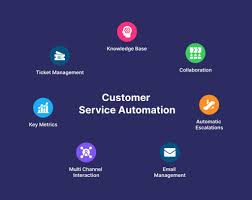
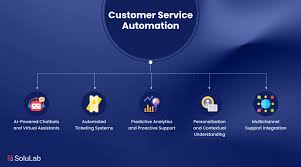
AI chatbots are the cornerstone of real-time query automation. They use natural language processing (NLP) to understand and respond to customer inquiries in a conversational manner.
Key Features of Effective Chatbots:
- Multilingual support for global customers.
- Seamless integration with CRM tools for personalized interactions.
- The ability to escalate complex issues to human agents.
Example: A travel website uses a chatbot to provide instant answers about flight availability, booking changes, and cancellation policies.
3. Leverage Live Chat with Automation
While chatbots handle basic queries, live chat tools equipped with automation features can enhance the support process. For instance:
- Automate greeting messages and collect initial information, such as the customer’s name and query type.
- Route conversations to the appropriate department based on the query.
This hybrid approach ensures a balance between automation and human intervention.
4. Create a Comprehensive Knowledge Base
A well-organized knowledge base allows chatbots and automation systems to provide accurate answers. Include:
- FAQs
- How-to guides
- Troubleshooting steps
Ensure the knowledge base is updated regularly to reflect changes in policies or products.
Tip: Allow customers to access the knowledge base directly for self-service support.
5. Personalize Responses
Customers appreciate personalized experiences. Use automation tools to tailor responses based on:
- Customer history and preferences.
- The products or services they’ve interacted with.
For example, an e-commerce chatbot can recommend complementary products based on a customer’s previous purchases.
6. Monitor and Optimize Performance
Automation isn’t a one-time setup. Continuously monitor performance metrics like:
- Response times
- Query resolution rates
- Customer satisfaction scores
Use these insights to refine automation workflows and address gaps.
Examples of Successful Automation
1. E-commerce
An online retailer automates queries about order status and returns. Customers simply input their order number, and the system provides instant updates.
2. SaaS Companies
Software providers use automation to assist customers with subscription management and troubleshooting. For instance, a chatbot guides users through resetting their accounts or resolving common technical issues.
3. Healthcare
Healthcare providers integrate chatbots to help patients book appointments, check test results, and answer general health-related questions.
Tools for Automating Customer Queries
Several tools can help streamline query automation:
- Zendesk Support: Combines ticket management with automation features.
- Intercom: Offers AI-powered chatbots and customizable live chat tools.
- HubSpot Service Hub: Provides a mix of automation and CRM integration for personalized support.
- Tidio: Affordable and user-friendly for small businesses.
Common Challenges and How to Overcome Them
- Handling Complex Queries:
Solution: Implement a system to escalate such issues to human agents. - Ensuring Accuracy:
Solution: Regularly update your knowledge base and train AI models to improve response quality. - Maintaining a Human Touch:
Solution: Personalize interactions and allow customers to contact live agents when needed.
Conclusion
Real-time query automation is essential for businesses looking to improve efficiency and customer satisfaction. By following these best practices for automating customer queries in real-time, you can deliver faster responses, enhance user experiences, and scale your operations effectively.
Start exploring automation tools and strategies today to stay ahead in the competitive digital landscape. With the right approach, you’ll build stronger customer relationships and drive long-term success.
