

On-Page SEO Best Practices You Can Automate for Ranking
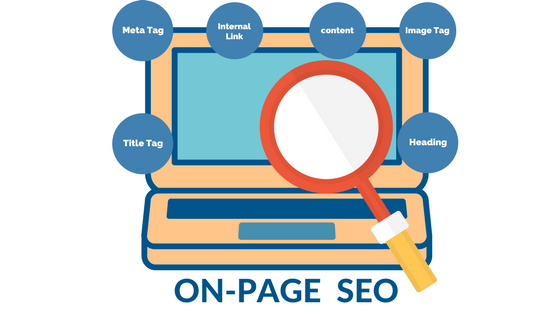
On-page SEO is a critical element of any successful digital marketing strategy. It involves optimizing individual web pages to improve search engine rankings and drive organic traffic. However, executing on-page SEO can be time-consuming and complex, especially as you scale. On-page SEO best practices you can automate for maximum impact allow you to streamline efforts, improve efficiency, and ensure that critical optimizations are consistently applied. In this article, we will explore key on-page SEO tasks that can be automated to save time, enhance your site’s performance, and boost your search engine visibility.
1. Automating On Page SEO Title Tags and Meta Descriptions
Title tags and meta descriptions play a vital role in on-page SEO as they help search engines understand the content of your pages while encouraging users to click through from search results. Manually creating and optimizing these elements for every page can be tedious. Fortunately, automation tools can simplify this process.
Tools to Automate On-Page SEO Title Tags and Meta Descriptions
- Yoast SEO: For WordPress users, Yoast SEO allows you to automatically generate optimized title tags and meta descriptions based on custom templates. It ensures consistency across pages and saves time.
- SEMrush: This tool offers an automation feature for creating and managing meta tags. It can generate optimized title tags based on target keywords and even provide recommendations for improvement.
By automating title tags and meta descriptions, you ensure that every page is optimized for both search engines and user intent, enhancing both rankings and click-through rates.
2. Image Optimization Automation
Images can significantly impact page load speed, which is an essential ranking factor for SEO. Manually compressing and resizing images for every page is inefficient, especially for large websites with numerous images. Automating image optimization ensures your site loads faster without compromising image quality.
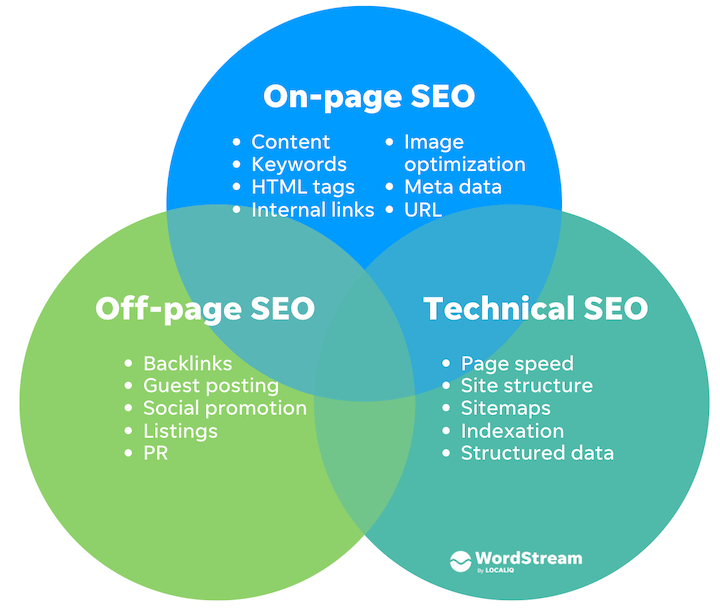
Automated Image Optimization Tools
- Smush: This WordPress plugin automatically compresses and optimizes images without affecting their quality. It also offers lazy loading for improved performance.
- TinyPNG: TinyPNG provides an API for automating the compression of images as they are uploaded, reducing their file sizes while maintaining high-quality visuals.
Automating image optimization helps reduce load times and ensures a faster, more efficient website, which is crucial for both SEO and user experience.
3. Automating Internal Linking for On-Page SEO
Internal linking is one of the easiest ways to boost SEO by guiding search engines to crawl your website’s most important pages. However, manually adding links to every post or page can be time-consuming. Automation can simplify internal linking and improve your site’s overall SEO structure.
Internal Linking Tools
- Link Whisper: This tool for WordPress automates the process of finding relevant internal linking opportunities as you create content. It suggests links to related pages based on keywords and content context, saving time while improving SEO.
- SEO Auto Links & Related Posts: This plugin for WordPress automatically creates internal links between your posts based on keyword relevance and context, boosting SEO without the need for manual effort.
By automating internal linking, you can quickly create a more connected, crawlable website structure that helps improve the SEO value of your content.
4. Automating SEO Audits and Performance Monitoring
Regular SEO audits are essential to ensure that your website remains optimized and up to date with SEO best practices. However, manual audits can be time-consuming and may overlook critical issues. Automating SEO audits helps you identify problems, such as broken links, slow page speeds, and missing tags, in real-time.
Tools for Automated SEO Audits
- Screaming Frog SEO Spider: This tool crawls your website to identify common SEO issues, such as missing meta descriptions, duplicate content, and broken links. You can set up automated crawls to run on a schedule.
- Google Search Console: This free tool from Google provides automated reports on site performance, highlighting issues that could affect SEO, such as mobile usability or site errors.
Automated SEO audits help maintain the health of your website and ensure that you’re always following the latest SEO guidelines.
5. Automating Structured Data Implementation
Structured data, also known as schema markup, helps search engines understand the context of your content, leading to enhanced rich snippets and better visibility in search results. Implementing structured data manually can be complex, but automation tools can streamline the process.
Tools for Automating Structured Data for On-Page SEO
- Schema Pro: This WordPress plugin automates the process of adding structured data to your website, ensuring that it’s correctly implemented across all pages.
- Google Tag Manager: For advanced users, Google Tag Manager allows for the automation of structured data deployment, making it easier to add and manage schema markup across your website.
By automating structured data implementation, you improve how your content appears in search engine results and increase your chances of gaining featured snippets.
6. Content Optimization with AI and Automation
Creating high-quality, SEO-optimized content is essential for ranking well on search engines. Automating content optimization can save time and help ensure that your content is optimized for both users and search engines.
Content Optimization Tools
- Frase: Frase uses AI to automatically suggest content optimization strategies based on target keywords. It provides a content brief, keyword recommendations, and outlines for your posts.
- Clearscope: This tool helps optimize content by automatically analyzing top-ranking pages for a specific keyword and suggesting related terms and phrases to include in your content.
By automating content optimization, you can ensure that your content is always relevant, well-structured, and SEO-friendly.
Conclusion
On-page SEO best practices you can automate for maximum impact allow you to streamline and optimize crucial aspects of your website without constant manual effort. From automating title tags and meta descriptions to compressing images, managing internal links, and performing regular audits, automation can significantly enhance your site’s SEO performance. By integrating these automation tools into your strategy, you ensure consistent, efficient, and scalable optimization efforts that can boost your search engine rankings and user experience.
Start automating your on-page SEO today and free up time to focus on other important aspects of your digital marketing strategy!
