

How Website Automation to Save Time and Cost for Business
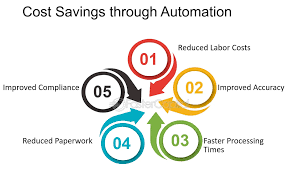
In today’s fast-paced digital world, businesses face constant pressure to improve efficiency, reduce operational costs, and stay competitive. Website automation offers a powerful solution, transforming how businesses manage their online presence. From streamlining routine tasks to enhancing customer experiences, automation empowers companies to save valuable time and cut costs without compromising quality.
This article explores how website automation reduces time and cost for business, highlighting its benefits, key tools, and real-world examples to showcase its impact. Whether you’re a small startup or a large enterprise, understanding and implementing website automation can significantly boost your bottom line.
The Time-Saving Power of Website Automation
1. Automating Content Management
Managing website content manually can be tedious and time-consuming. Automation tools like WordPress or HubSpot CMS simplify this process by:
- Scheduling content publication across multiple pages.
- Automatically categorizing and tagging posts for better organization.
- Updating outdated content without manual intervention.
Example: A marketing agency used automation to schedule blog posts for a client, cutting content management time by 40%.

2. Streamlining Updates and Maintenance
Frequent website updates—whether for security patches or new features—are essential but often time-intensive. Automation tools like WP Engine and Auto Update Manager handle:
- Installing updates for plugins and themes.
- Backing up website data before making changes.
- Running diagnostic checks to ensure compatibility.
Benefit: Businesses can avoid costly downtime while keeping their websites secure and functional.
3. Simplifying E-commerce Operations
For online retailers, automation plays a pivotal role in managing:
- Inventory Tracking: Tools like Shopify and BigCommerce automatically update stock levels based on sales.
- Order Fulfillment: Integration with shipping services automates label creation and tracking.
- Customer Notifications: Email alerts and order confirmations are sent automatically.
Case Study: An e-commerce store reduced order processing time by 60% by automating inventory and shipping workflows.
Cutting Costs Through Website Automation
1. Reducing Labor Costs
Automation minimizes the need for manual intervention, allowing businesses to operate with smaller teams. Key areas of cost savings include:
- Customer Support: Chatbots powered by AI, like Zendesk and Tidio, handle common customer queries 24/7.
- Website Design: Tools like Wix ADI create professional layouts without hiring designers.
- Data Entry: Automated forms collect and organize data, eliminating errors and repetitive tasks.
Result: Businesses can reallocate resources to strategic initiatives rather than routine tasks.
2. Improving Marketing ROI
Marketing automation platforms such as Mailchimp and HubSpot help businesses reduce spending while improving results by:
- Targeting the right audience through personalized campaigns.
- Automating email follow-ups to boost engagement.
- Tracking campaign performance in real time.
Example: A small business saved $5,000 annually by automating email marketing campaigns while doubling their lead conversion rate.
3. Minimizing Errors and Associated Costs
Manual processes often lead to errors, resulting in financial losses or reputational damage. Automation reduces these risks by:
- Ensuring accurate data entry with AI-powered tools.
- Detecting broken links and fixing them automatically using platforms like Screaming Frog.
- Preventing duplicate or incomplete transactions in e-commerce systems.
Insight: By automating error-prone tasks, companies can avoid costly mistakes and maintain customer trust.
Tools for Effective Website Automation
1. Content Automation
- WordPress: A versatile CMS for scheduling and managing content.
- Buffer: Automates social media posting, driving traffic to your site.
2. Customer Interaction Automation
- Intercom: Provides AI chatbots for real-time customer support.
- LivePerson: Delivers personalized conversations through automation.
3. Analytics and Reporting Automation
- Google Analytics: Automatically generates reports on website traffic and user behavior.
- Hotjar: Automates heatmap creation to analyze user interactions.
Real-World Examples of Website Automation Success
- Retail Industry: An online fashion retailer used inventory automation to reduce manual stock checks, saving 15 hours weekly and cutting labor costs by 30%.
- Healthcare Sector: A clinic automated appointment bookings through its website, freeing up administrative staff for other tasks and improving patient satisfaction.
- Education: An online learning platform implemented automated grading systems for assignments, enabling faster feedback and reducing workload.
Conclusion
Website automation reduces time and cost for business by optimizing processes, enhancing efficiency, and minimizing errors. From managing content and e-commerce operations to improving customer interactions, automation empowers businesses to achieve more with fewer resources.
Start leveraging website automation today to unlock its full potential and stay ahead of the competition. If you’re ready to transform your business, explore our range of automation tools designed to streamline your operations and deliver measurable results.

[…] a reality. With modern tools, platforms, and strategies, anyone can create a professional website in no time. Whether you’re starting from scratch or upgrading an outdated site, this guide will help you […]